

About LionCommand
The command center for construction operations.
LionCommand is a construction operations platform designed to bring project information, field activity, communication, and administrative workflows into one organized workspace. Built for contractors and construction teams, it helps office staff, project leaders, field teams, and approved outside collaborators stay connected to the work happening across each job.
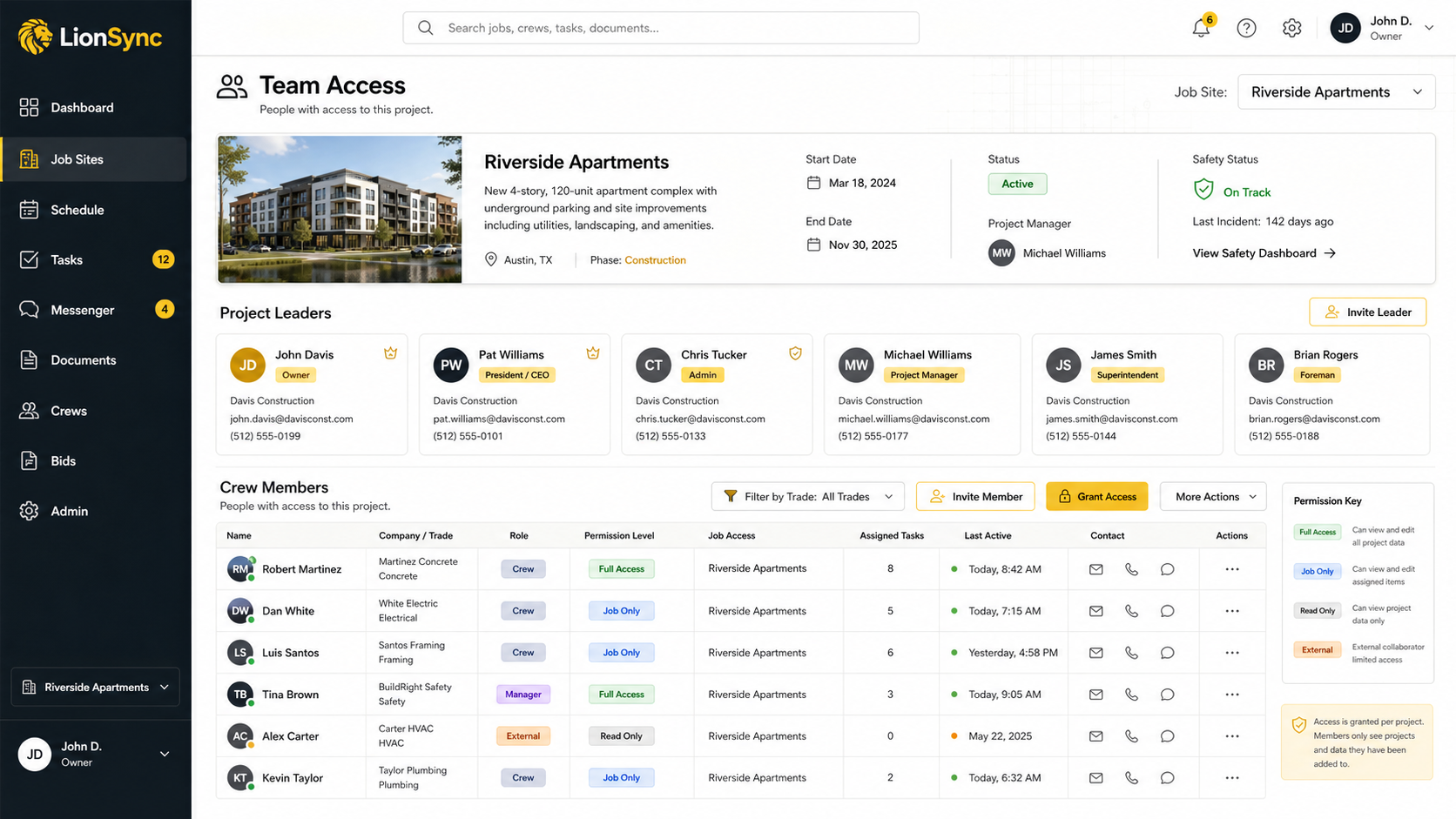
What it solves
One place for the work behind every job
LionCommand is built to reduce the fragmentation that happens when schedules, documents, project decisions, field updates, and team communication live in different places. Each job becomes a central workspace where authorized team members can find the information and tools relevant to their role.
Capabilities
What LionCommand can manage
A snapshot of the workflows LionCommand supports today across office and field teams.
Project and job management
Create organized job workspaces with project details, locations, schedules, assigned teams, progress information, and the records connected to each job.
- Centralize project information
- Assign teams and responsibilities
- Track progress in one place
- Keep every record connected
Team and permission management
Add organization members, assign people to specific jobs, and control access through organization roles, job membership, and project permissions.
- Invite and manage members
- Assign people to jobs
- Control role-based access
- Keep unrelated jobs restricted
Plan & Coordinate
- Tasks and field coordination
Create, assign, update, and track project tasks, priorities, due dates, and completion status.
- Punch-list tracking
Record punch items, assign responsibility, attach supporting photos, and follow work through completion.
- Calendar and scheduling
Keep job-related events, deadlines, and assigned activities visible through a shared project calendar.
- Timekeeping
Record clock-in and clock-out activity and connect labor time to the appropriate project.
Decide & Approve
- RFIs
Create and manage project questions, responsibility, responses, and status within the correct job.
- Change orders
Track change-order descriptions, status, supporting records, and authorized financial visibility.
- Bidding and vendor coordination
Prepare bid packages, invite vendors, share relevant documents, and track controlled bid responses.
- Materials and procurement
Organize material-order activity and keep procurement records connected to the job.
Communicate & Document
- Messaging and announcements
Share job-related conversations, channel-based communication, announcements, and reactions.
- Job notes
Capture observations and supporting context so important project information stays with the job.
- Documents and photos
Store documents, photographs, and attachments in the context of the records they support.
Workflow
How work moves through LionCommand
- 1
Set up the job
Add the project details, location, schedule, team, and initial documents.
- 2
Coordinate the work
Create tasks, organize field activity, communicate with the team, and record project events.
- 3
Manage project decisions
Track RFIs, change orders, bids, vendor responses, and supporting documents.
- 4
Follow progress
Review task status, punch items, time entries, material activity, and project updates.
- 5
Maintain the record
Keep messages, notes, files, audit activity, and completed project information connected to the job.
Roles
Built to connect the office and the field
LionCommand is designed so each person can work from the same project record without receiving access to every part of the business. Office teams can manage project and administrative information while field teams focus on the jobs, tasks, documents, conversations, and updates assigned to them.
- Business owners and administrators
- Project managers
- Superintendents
- Field supervisors
- Employees and crew members
- Subcontractors
- Vendors
- Inspectors
- Owner representatives or approved guests
Structure
Every record stays connected to the job
LionCommand organizes operational information around the project it belongs to. Instead of searching through disconnected inboxes and folders, authorized users can move from the job overview to its tasks, RFIs, change orders, files, bids, materials, calendar, team, and communication.
Access
The right access for the right people
LionCommand is being built around organization roles, job assignments, and project-level permissions. The goal is to give users access to the work they are responsible for while keeping organization administration, sensitive information, and unrelated jobs restricted.
- Authenticated accounts
- Organization membership
- Job assignments
- Role-aware navigation
- Project permissions
- Guest and vendor invitations
- Audit history
- Controlled document access
Product status
Currently in private preview
LionCommand is actively being developed and tested with controlled access. Some capabilities may continue to evolve as workflows, permissions, reliability, and production readiness are validated.
Company
A LionSync LLC product
LionCommand is developed and operated by LionSync LLC. LionSync builds practical software intended to help businesses organize work, improve visibility, and connect the people responsible for day-to-day operations.
Contact: services@lionsync.us
Get in touch
Bring your project information into one command center
Explore how LionCommand can help organize the people, records, communication, and activity behind each construction project.
LionCommand and TradeLog Site are products of LionSync.LLC.